

Table of Contents
To ensure your account remains safe and secure, we recommend updating your password periodically. If you are already logged into your ShareHK account and want to change your current password, follow this quick guide.
Step-by-Step Password Update Guide #
Step 1: Log In to Your Account #
- Go to the top right corner of ShareHK.co.uk, click the Account Icon, and log in with your current email and password.
Step 2: Navigate to Your Member Page #
- Once logged in, you will be automatically directed to your personal Member Dashboard (My Account page).
Step 3: Access Account Details #
- From the dashboard navigation menu, find and click on Account details.
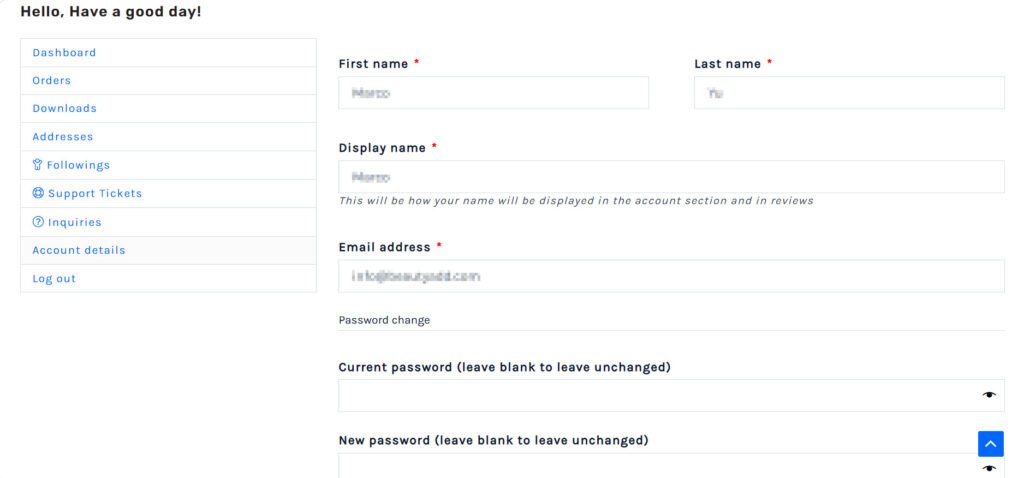
Step 4: Enter Your Password Details #
Scroll down to the Password change section of the page and fill out the following three fields:
- Current password: Type your existing password (the one you used to log in).
- New password: Type your new, secure password.
- Confirm new password: Re-type your new password exactly as you did in the previous field to ensure there are no typos.
Step 5: Save Your Changes #
- Click the Save changes button at the bottom of the form.
🔐 Security Tip: A confirmation message will appear at the top of the page letting you know your account details have been successfully updated. The next time you log in, make sure to use your new password!


