

Welcome to ShareHK! This guide will walk you through the initial registration process for your Vendor account. Please follow these three steps as demonstrated in the video:
Step 1: Account Verification #
- Select Your Plan: Choose between the “Standard Vendor” or “Premium Vendor” plan based on your business needs.
- Data Entry: Enter your desired username and email address.
- Email Confirmation: Click to send the verification code. Check your inbox, retrieve the 6-digit code, and enter it to proceed.
Step 2: Profile Setup #
Please ensure all details are filled in accurately to help local customers find you:
- Business Info: Your name, Shop Name, and a full Address (including City and Postcode).
- Contact Info: A valid phone number.
- Business Category: Tell us what you are selling so we can categorize your shop correctly.
- Security: Set a strong password and confirm it.
Step 3: Payment and Completion #
- Review: Double-check all entered details to ensure there are no errors.
- Payment Details: Enter your credit card information on the secure payment page.
- Finalize: Click “Submit” to officially complete the registration process.
Account Review & Onboarding Tutorials #
Upon completing your vendor registration, our team will review your application. The review and full account activation process typically takes 1 working day.
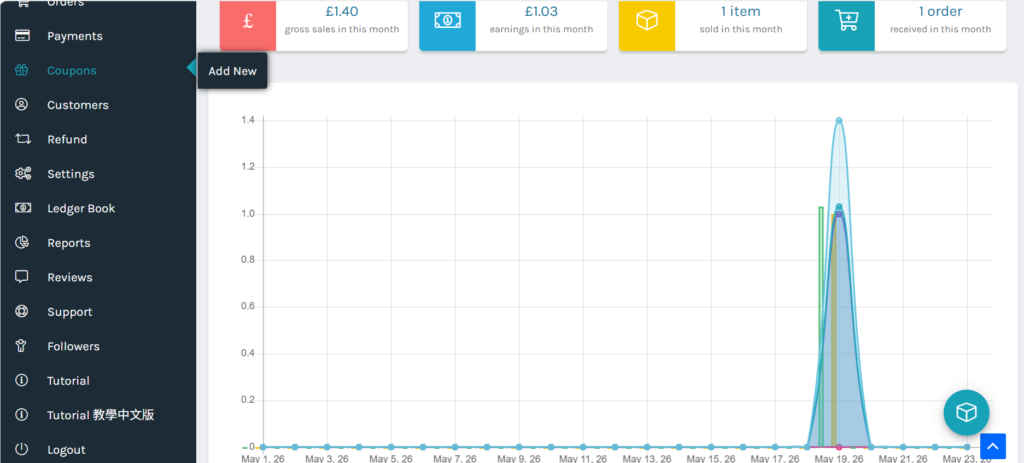
Once your account is activated and you log in to the Vendor Dashboard for the first time, you can access our comprehensive step-by-step training guides. As shown in the image below, look at the bottom of the main menu navigation bar to find the “Tutorial” or “Tutorial 教學中文版” section. Inside, you will find detailed documentation to help you manage your store, including:
- Lesson 2: Introduction to Shop Login & Vendor Backend Interface
- Lesson 3: Basic Shop Setup & SEO Optimization Tutorial
- Lesson 4: Shop Address & Geolocation Settings Tutorial
- Lesson 5: Linking Your Stripe Payout Account Tutorial
- Lesson 6: Shipping & Delivery Fee Configuration (Within the UK)
- Lesson 7: How to Optimize SEO to Boost Your Shop Ranking
- Lesson 8: Customer Support Setup
- Lesson 9: Managing Your Shop Operating Hours
We highly recommend all new vendors read through these lessons to ensure a smooth onboarding experience and set your shop up for success!


