

Table of Contents
1. Reading Your Transaction Details #
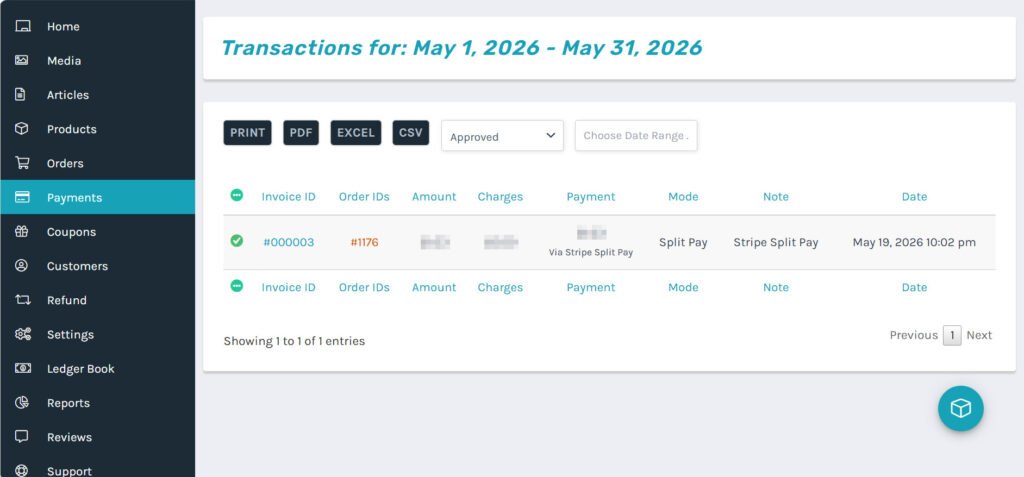
Based on the order settlement screen in your vendor dashboard, every transaction is broken down as follows:
- Order Total: The total amount the customer paid for the order (product price + shipping fees).
- Vendor Commission / Admin Commission: Displayed as 0. ShareHK currently does not charge any platform commission or administration fees.
- Net Earnings: This is the actual amount you earn and will receive. Because we offer a 0% commission structure, your net earnings are 100% identical to the Order Total:$$\text{Order Total} = \text{Net Earnings}$$
2. What is Stripe Split Pay? #
ShareHK utilizes advanced financial technology called Stripe Split Pay.
- How it works: Even though the platform does not take a cut, this technology ensures that the exact moment a customer completes their payment via credit/debit card, Stripe instantly processes the transaction and routes 100% of the funds (Net Earnings) directly and securely into your dedicated vendor sub-account.
- The benefit: This guarantees maximum financial transparency and security. Your revenue is handled entirely and legally by Stripe’s automated system. The platform administration never handles, touches, or detours your business sales.
3. Crucial: The Fulfillment Flow & Order Status #
To protect both buyers and sellers, the release of your funds depends entirely on your shipping actions. You must strictly follow these operational steps:
- Ship the Product First: As soon as you prepare and pack the customer’s items, dispatch them via Royal Mail. Enter the tracking details into the backend and switch the order status to Shipped.
- Change Status to “Completed”: Once the tracking status shows the item has been delivered successfully, you must return to that specific order page, change the status from Shipped to Completed, and click UPDATE.
⚠️ Important Note: The 18-day payout safety countdown only begins after you manually change the order status to Completed. If you leave the order status as Shipped, your payout timeline will not start!
4. When Will You Receive Your Money? #
#
Stripe implements a secure clearing period and a structured monthly payout schedule:
- The 18-Day Holding Period: Once you update an order status to Completed, your funds enter a standard 18-day holding phase to account for potential customer return windows or disputes.
- Beginning-of-the-Month Automatic Payouts: Any funds that have cleared their 18-day holding period and become unlocked will be automatically transferred (paid out) by Stripe directly into your linked bank account at the very beginning of each calendar month (typically on the 1st or within the first few working days of the month).
💡 Example Scenario:
- You change an order status to Completed on May 1st.
- Following the 18-day holding period, the funds are officially cleared and unlocked on May 19th.
- Since automatic payouts happen at the start of each month, this unlocked balance will be transferred directly to your bank account at the beginning of the next month (early June).


